Margin Markup Calculator
Margin vs Markup Calculator:
Pricing products correctly is essential for profitability. Our Margin vs Markup Calculator helps you calculate profit margins, determine markup percentages, and use a margin to markup converter or markup to margin converter instantly. Whether you’re a retailer, wholesaler, eCommerce seller, or service provider, understanding the difference between margin and markup can help you set profitable prices and avoid costly pricing mistakes.
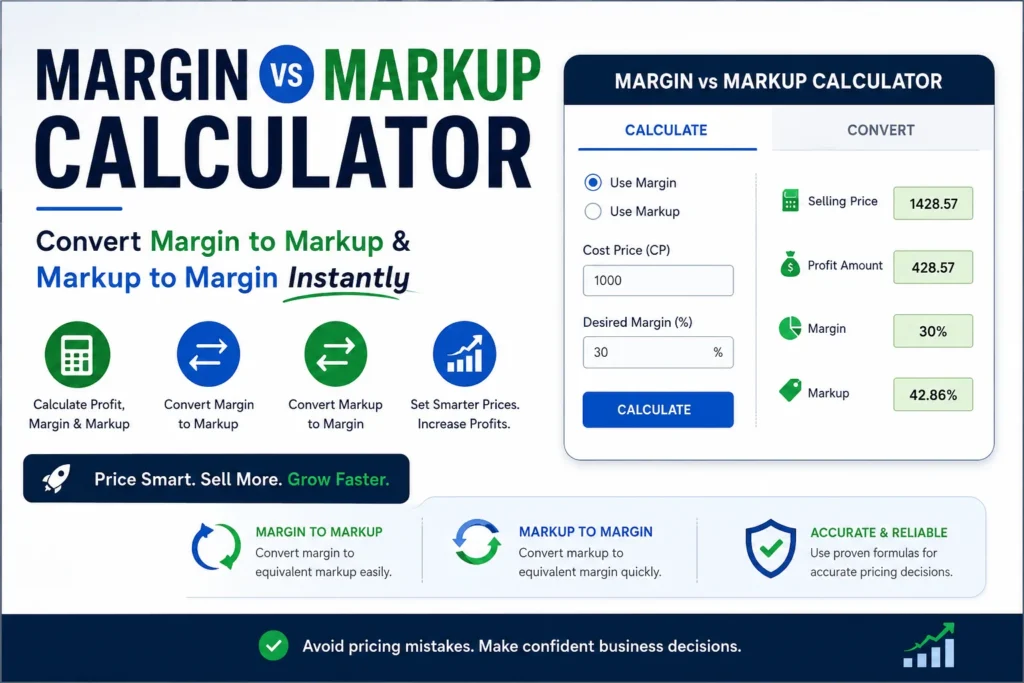
Many business owners mistakenly assume markup and margin are the same. They are not. A 50% markup does not equal a 50% margin. This Margin vs Markup Calculator eliminates confusion by allowing you to accurately calculate profit, selling price, markup percentage, and margin percentage in seconds.
In this guide, you will understand the difference between the two, learn how to calculate each formula manually, and use simple techniques to price your products correctly. By the end of this article, you will confidently calculate profit, adjust pricing, and improve your overall business profitability.
Table of Contents
What Is Margin in a Margin vs Markup Calculator?
Margin (Profit Margin) is the percentage of revenue that becomes profit after covering all costs.
Margin Formula
Margin = (Profit / Selling Price) × 100Example
- Selling Price = $100
- Cost Price = $60
- Profit = $40
- Margin = 40%
This means for every $100 you sell, you earn $40 as profit.
Margin focuses on the final selling price and how much of it you keep as profit.
What Is Markup?
Markup is the percentage you add to the cost price to determine the selling price.
Markup Formula
Markup = (Profit / Cost Price) × 100Example
- Cost Price = $60
- Profit = $40
- Markup = 66.67%
Markup focuses on the cost price, not the selling price.
Margin vs Markup Calculator: Understanding the Key Difference
Margin and markup explain profit from two different angles.
| Basis | Margin | Markup |
|---|---|---|
| Based On | Selling Price | Cost Price |
| Formula | Profit ÷ Selling Price | Profit ÷ Cost Price |
| Use Case | Measure profitability | Set pricing |
| Example | 40% margin | 66.67% markup |
Many business owners mistakenly use the wrong one, leading to incorrect pricing. The calculator helps avoid such mistakes.
How to Calculate Margin and Markup Using a Margin vs Markup Calculator?
Understanding how to calculate margin and markup manually helps you price products correctly and avoid costly pricing mistakes. While calculators give instant results, knowing the formulas ensures you fully understand how profit is calculated.
Below are step-by-step methods to calculate both margin and markup using standard business formulas.
How to Calculate Margin?
Profit margin shows how much profit you keep from your selling price.
Formula
Margin = (Profit ÷ Selling Price) × 100
Steps
- Subtract cost price from selling price to get profit
- Divide profit by selling price
- Multiply the result by 100
Example
Selling Price = ₹100
Cost Price = ₹70
Profit = ₹30
Margin = (30 ÷ 100) × 100 = 30%
This means you earn ₹30 profit for every ₹100 in sales.
How to Calculate Markup?
Markup shows how much you increase the cost price to decide the selling price.
Formula
Markup = (Profit ÷ Cost Price) × 100
Steps
- Subtract cost price from selling price to get profit
- Divide profit by cost price
- Multiply the result by 100
Example
Cost Price = ₹70
Selling Price = ₹100
Profit = ₹30
Markup = (30 ÷ 70) × 100 = 42.86%
This means the selling price includes a 42.86% increase over the cost.
Key Takeaway
- Margin is calculated on selling price
- Markup is calculated on cost price
- Markup is always higher than margin for the same product
Using the correct formula ensures accurate pricing and predictable profits.
Margin to Markup Converter
If you know your desired margin, you can find the required markup.
Formula
Markup = Margin / (1 – Margin)Example
You want a 30% margin.
Markup = 0.30 / (1 − 0.30) = 0.428 = 42.8% markup
Convert Markup to Margin
If you know markup, you can calculate the margin.
Formula
Margin = Markup / (1 + Markup)Example
Markup = 50%
Margin = 0.50 / 1.50 = 33.33% margin
Common Mistakes in Pricing
1. Using Markup Thinking It Is Margin
Many businesses think “50% markup” equals “50% margin”.
Wrong.
50% markup = only 33.33% margin.
2. Not Accounting for Hidden Costs
Costs could include:
- Packaging
- Shipping
- Payment gateway fees
- Platform fees
- Staff salary
- Electricity and rent
Ignoring these reduces margin drastically.
3. Giving Discounts Based Only on Margin
If your margin is 30%, you cannot give a 20% discount unless you adjust markup.
Benefits of Using a Margin vs Markup Calculator
A calculator solves all these problems instantly.
Benefits
- Gives exact markup for required profit
- Calculates selling price correctly
- Saves time and avoids manual errors
- Supports businesses in setting competitive prices
- Helps manage discounts and profitability
How to Use the Calculator
- Enter the Cost Price
- Enter either:
- Desired Margin OR
- Desired Markup
- The calculator gives:
- Profit
- Selling Price
- Margin %
- Markup %
- Profit amount
This removes guesswork and provides accurate pricing.
Examples of Margin & Markup in Real Business
1. Retail Store
A retailer buys shirts at ₹400 and sells at ₹649.
- Profit = ₹249
- Margin = 38.36%
- Markup = 62.25%
2. Amazon Seller
A seller buys a product for ₹200.
Amazon fees = ₹50
Cost = ₹250
They want a 30% margin.
Selling price = ₹357.14
3. Restaurant Business
Food cost = ₹90
Restaurants usually use 300% markup.
Selling price = ₹360
Margin = 75%
Why Margin Is More Important for Financial Planning
Businesses use margin for:
- Profitability measurement
- Cash flow planning
- Tax forecasting
- Pricing strategy
Markup is used more for selling and pricing.
Margin is the standard metric used by:
- Investors
- Accountants
- Financial analysts
- Retail reports
How Discounts Affect Margin
If your margin is 30% and you give a 10% discount, your margin drops significantly.
Example:
Selling Price = ₹1000
Cost Price = ₹700
Profit = ₹300 (30% margin)
Discount = 10% (₹100)
New Price = ₹900
Profit = ₹200
Margin = 22.22%
Discounts reduce margin more than expected.
That’s why calculators are essential.
Best Practices for Pricing Using Margin & Markup
- Always set pricing using markup.
- Review margins monthly to maintain profitability.
- Include hidden costs in cost price.
- Use calculators for accurate pricing.
- Avoid guessing—use formulas.
- Never confuse markup and margin.
- Recalculate prices whenever costs change.
- Use higher markup for low-cost items.
Conclusion
Margin and markup are two powerful metrics every business must understand. Using the right formulas helps you price correctly, maintain profitability, and plan for sustainable business growth. A Margin vs Markup Calculator saves time, eliminates confusion, and helps you take accurate pricing decisions every single time.
With the information in this guide, you can confidently manage your pricing and take full control of your business profits.
Frequently Asked Questions:
What is a Margin vs Markup Calculator?
A Margin vs Markup Calculator helps businesses calculate profit margin, markup percentage, selling price, and profit amount. It also works as a margin to markup converter and markup to margin converter.
What is the difference between margin and markup?
Margin is calculated as a percentage of the selling price, while markup is calculated as a percentage of the cost price. For the same product, markup is always higher than margin.
Why is markup always higher than margin?
Markup is based on cost price, while margin is based on selling price. Since cost is usually lower than selling price, the markup percentage becomes larger.
Is margin more important than markup
Both are important. Businesses commonly use markup for setting prices and margin for measuring profitability and financial performance.
Can I use this calculator for retail pricing?
Yes. Retailers, wholesalers, eCommerce sellers, Amazon sellers, manufacturers, and service businesses can use the calculator to determine profitable selling prices.
Does this calculator work as a margin to markup converter?
Yes. The calculator instantly converts margin percentages into equivalent markup percentages using industry-standard formulas.